Skip to main contenteBay Playbook
  • Get started
  • Foundations
  • Design system
  • Expressions
  • Resources
  • Articles

Design system

  • Overview
    • Overview
    • Color
    • Dimension
    • Spacing
    • Typography
    • Breakpoints
    • Shadow
    • Shape
    • Opacity
    • Motion
    • Overview
    • Status
    • Accordion
    • Action bar
      • Overview
      • Inline notice
      • Page notice
      • Section notice
    • Avatar
    • Badge
    • Banner
    • Breadcrumb
      • Overview
      • Branded button
      • CTA button
      • Icon button
      • Link button
    • Card
    • Carousel
    • CCD
      • Filter chip
      • Input chip
      • Graphs
      • Metrics
    • Date picker
    • Dialog
    • Divider
    • Education notice
    • EEK rating and range
    • Expansion
      • Checkbox
      • Combobox
      • Dropdown
      • Numeric stepper
      • Password
      • Phone number
      • Radio button
      • Select list
      • Switch
      • Text area
      • Text field
    • Item tile
    • List row
      • Overview
      • Expressive loader
      • Skeleton loader
    • Media container
      • Top navigation bar
    • Pagination
    • Popover
    • Progress stepper
    • Search field
    • Section header
    • Segmented button
      • Bottom sheet
      • Panel
    • Signal
    • Snackbar
    • Tab
    • Table
      • Tooltip
      • Tourtip
    • Toggle button group
    • Video player
    • Overview
    • Bulk editing
    • File uploading
      • Text link

Tokens overview

Tokens are representations of design decisions. They abstract raw values into scalable, meaningful, and readable labels spanning across teams and platforms.
Tokens overview

On this page

  • Overview
  • Token structure
  • Applying tokens
PreviousDesign system: Overview
Things.People.Love.
  • Get started
  • Foundations
  • Design system
  • Expressions
  • Resources
  • Articles
  • Careers
  • Press
  • Privacy policy
© 2025 eBay. All rights reserved.

eBay Evo, the eBay trademark, and the eBay logo are the intellectual property of eBay Inc.

    Overview

    Design tokens represent repeated decisions throughout a system and provide an avenue to apply them consistently. They replace raw values with meaningful labels that convey intention.

    Token structure

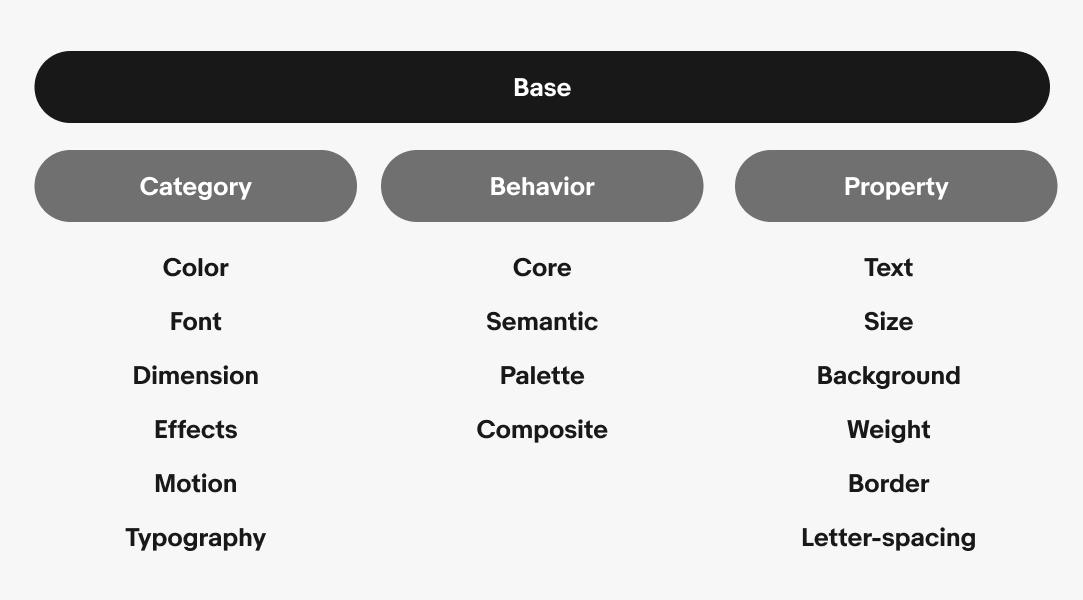
    Tokens are structured in a specific order for varying levels of specificity. Individual components and their nested elements can each have tokens if a semantic token isn’t providing enough clarity. This structure helps maintain the integrity of the token system over time.

    Applying tokens

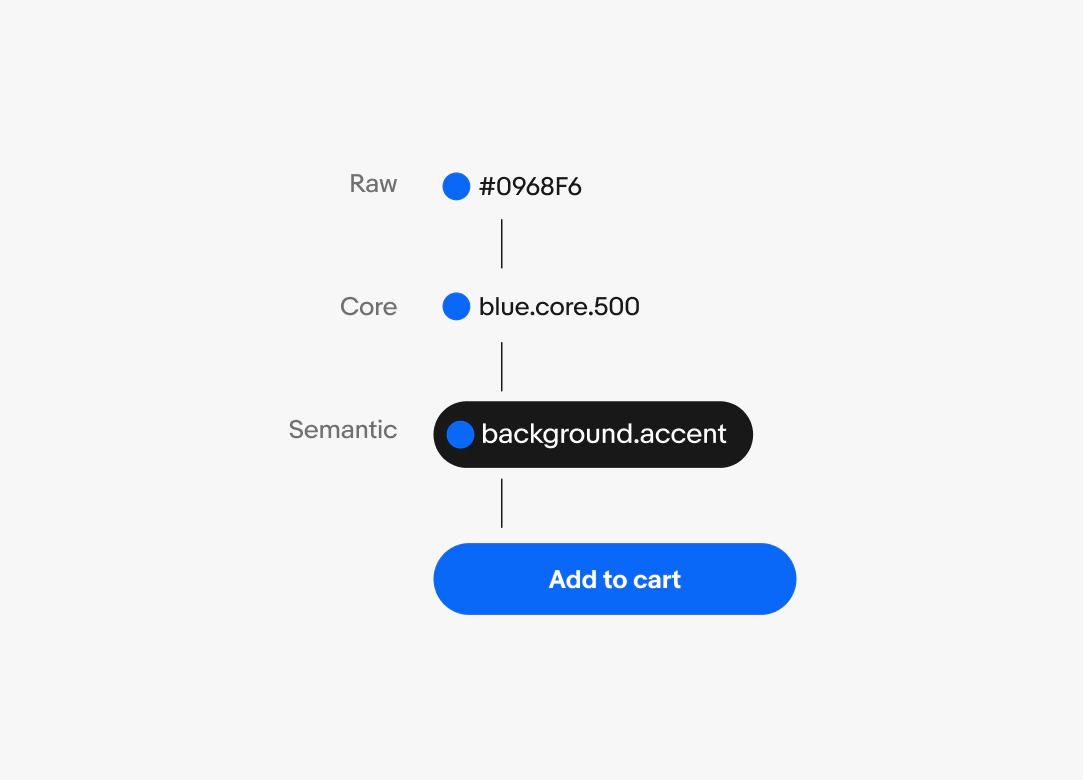
    Tokens progress in specificity from raw values to core tokens, semantic tokens, and component tokens.

    Tokens apply to a variety of value types, including:

    • Color
    • Typography
    • Spacing
    • Sizing
    • Radius
    • Opacity
    • Stroke width
    • Effects
    A graphic that moves from values and names leading up to a final blue primary cta button component. From top to bottom reads Raw: #0968F6, Core: blue.core.500, Semantic: background.accent, and Component: btn.container.background.primary.

    Backgrounds and foregrounds

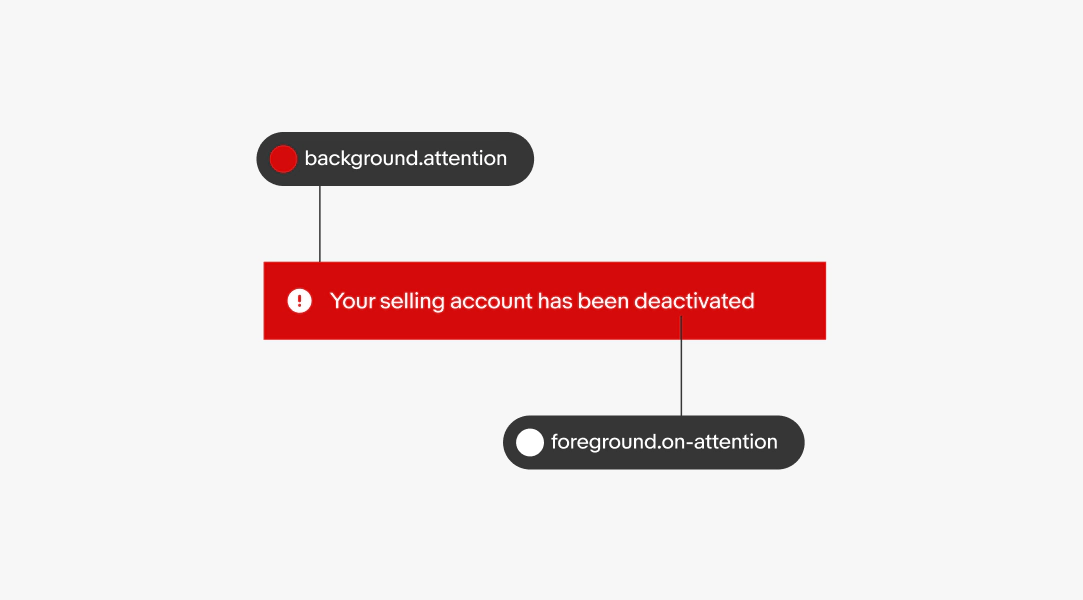
    The majority of tokens used are semantic tokens for background and foreground elements. Semantic colors like attention and success have corresponding foreground tokens like on-attention and on-success. This ensures color combinations are used appropriately and remain accessible.

    Examples of backgrounds:

    • Page background
    • Button container
    • Banner container

    Examples of foregrounds:

    • Icons
    • Text
    A section alert with token highlights. The background is a vibrant red called “background.attention. The foreground text is “foreground.on-attention”.

    Platform agnostic

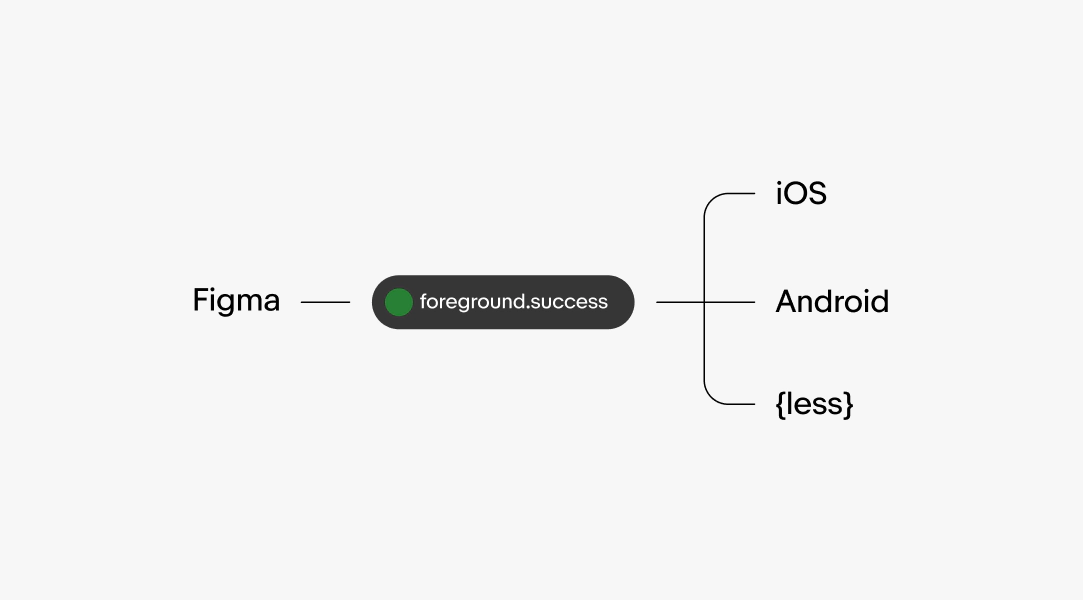
    Tokens are platform agnostic. The names remain similar despite slight alterations to the naming structure. The design library uses dots as separators with all letters lowercase, but can be converted to a preferred platform convention like dashes or camelCase.

    Tokens simplify documentation of design decisions and make sharing across teams easier. They establish a common language for styles and intention across all users of the system.

    A visual hierarchy graphic. From left to right Figma points to a pill shape with the token “foreground.success” in it. The pill points and branches out to 3 items. From top to bottom is IOS, Android, and {less}.

    Theming

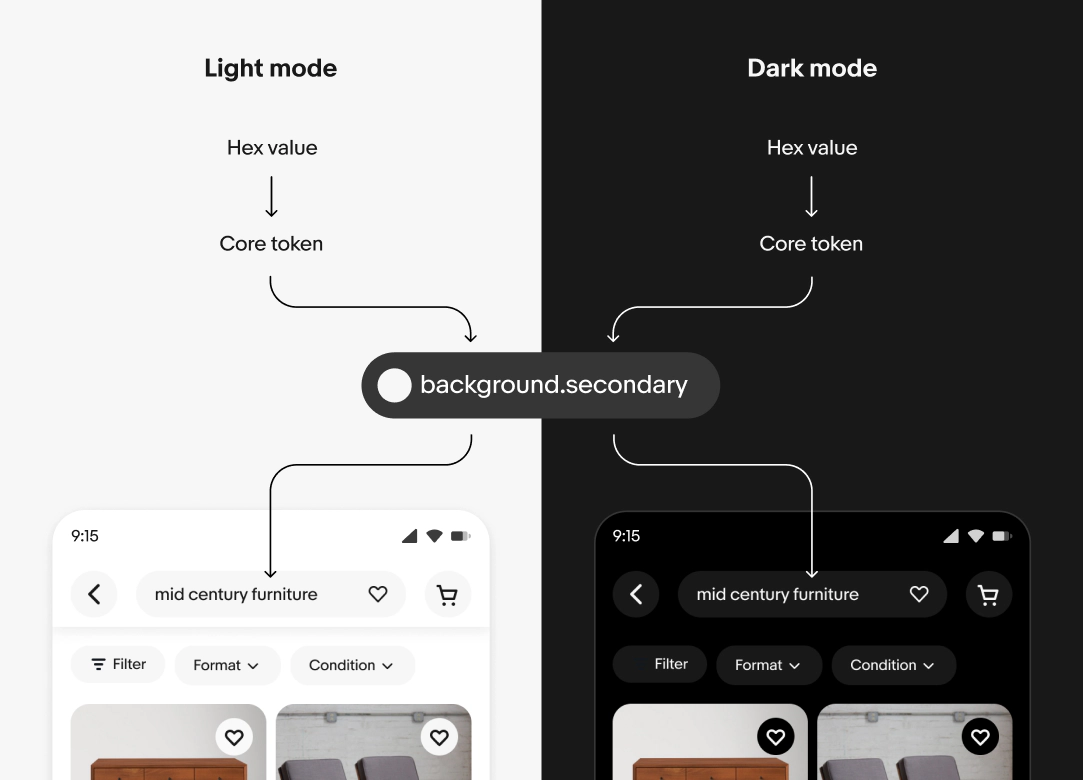
    A single token can point to different values depending on the context. The context can be a change in device theme, form factor, or accessibility settings.

    When a context changes, the reference values are updated automatically and the changes cascade throughout the system.

    The background.secondary token points to core.neutral.200 in light mode and core.neutral.800 in dark mode. These core tokens point to #F7F7F7 and #191919, respectively.

    Page composition

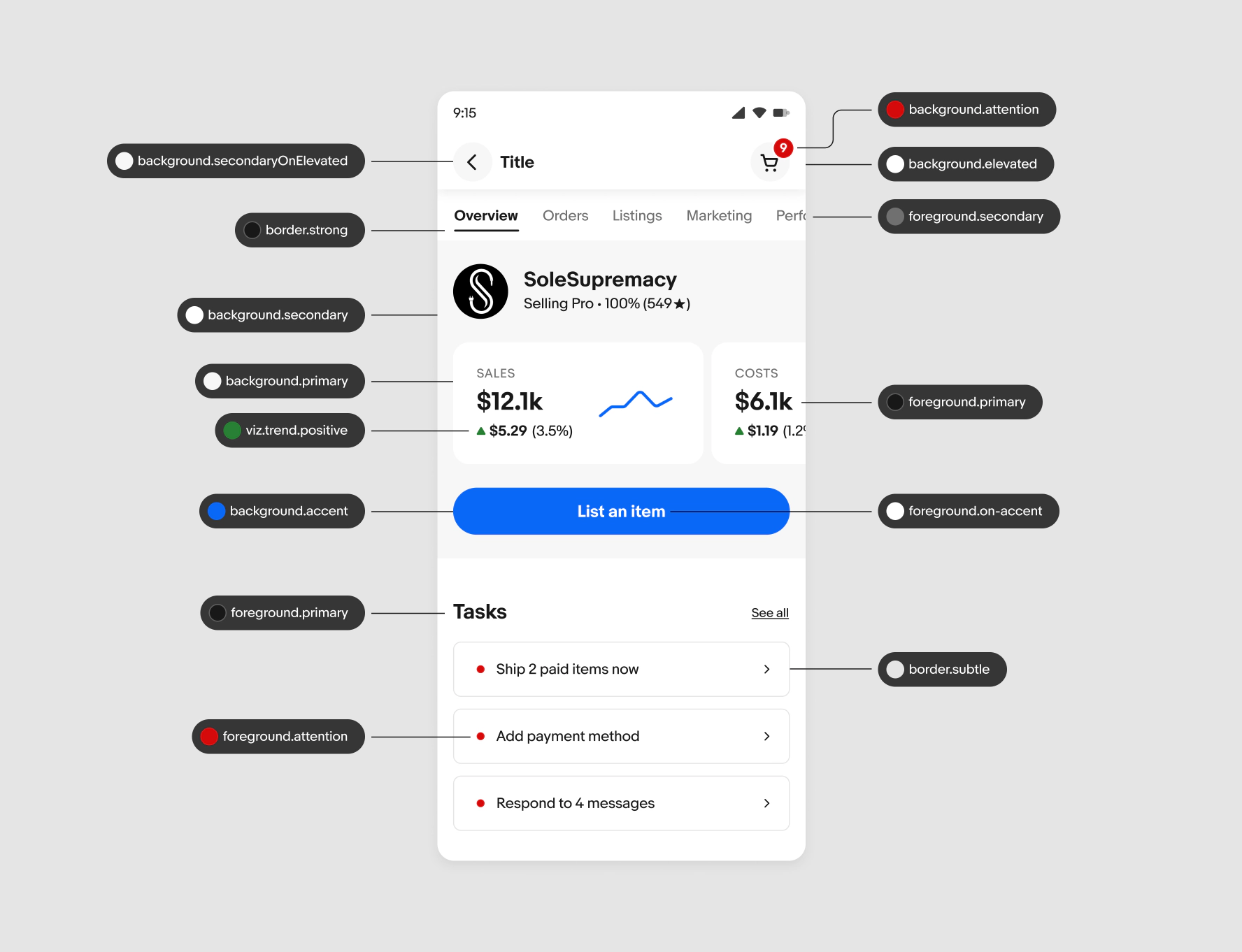
    Here’s an example of how tokens are used throughout a page. Background elements like containers and frames can stack on top of each other. Foreground elements, like text and icons, sit on top of backgrounds. Lastly, border elements include container strokes and dividers.
    A UI screen with token pill graphics pointing to elements. “background.secondaryOnElevated” points to an icon button background in the top nav bar. “border.strong” points to a tab underline. “background.secondary” points to a gray background under the top portion of content. A variety of other tokens point to buttons, foreground text, backgrounds, attention and accent colors, and borders.
    Object
    ComponentElement
    • combobox
    • button
    • form
    • left-icon
    • right-icon
    Base
    CategoryBehaviorProperty
    • color
    • font
    • spacing
    • size
    • shadow
    • breakpoint
    • feedback
    • visualization
    • action
    • heading
    • core
    • sem
    • text
    • size
    • bg
    • weight
    • border
    • letter-spacing
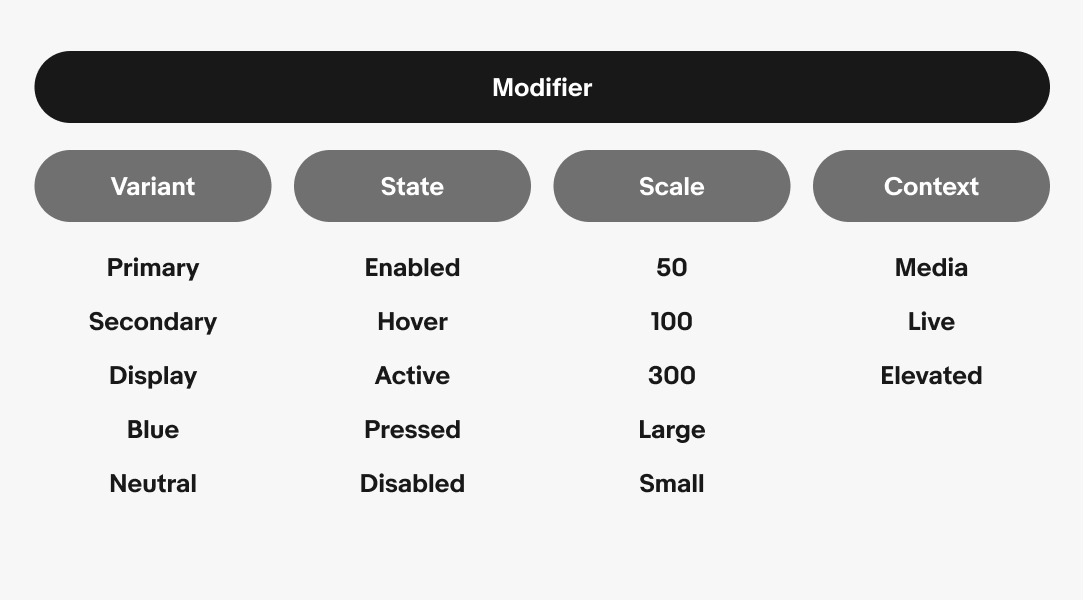
    Modifier
    VariantStateScaleContext
    • primary
    • secondary
    • tertiary
    • default
    • subtle
    • enabled
    • hover
    • active
    • pressed
    • disabled
    • 50
    • 100
    • 150
    • 200
    • 600
    • light
    • dark
    • high-contrast